Purchasing Power Tool
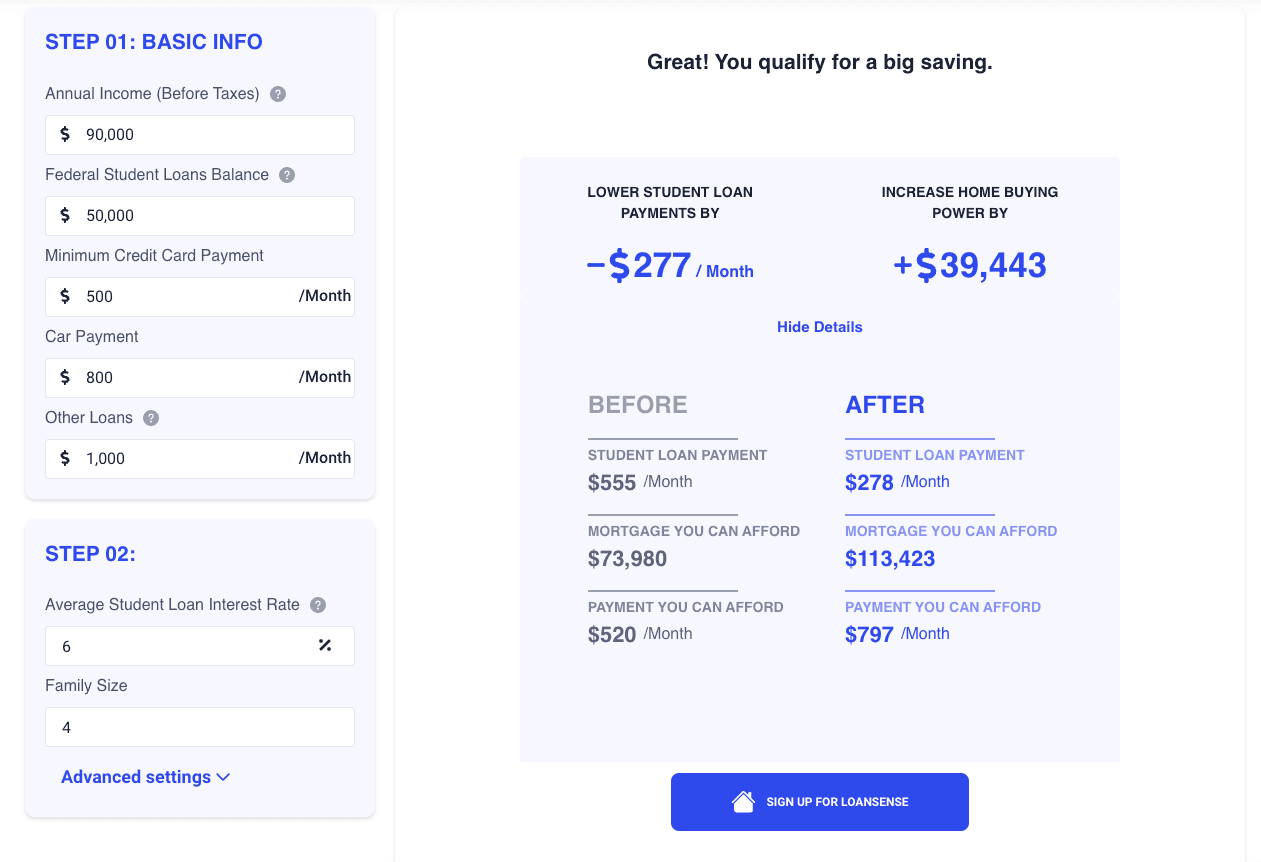
LoanSense Embedded Tools give both developers and non-developers a configurable application layer for the tool. All LoanSense Embedded Tools are production quality responsive web applications.
To access our embedded tools and apis contact us info@myloansense.com to get an api key.
Simple Embed Instructions
You can embed the purchasing power tool in your website or web application by simply copy and pasting the code snippet below. You will need to input your apiKey and your partnerCode that you receive from LoanSense.
<div id="loansense-widget"></div>
<script>
  (function (w, d) {
    if (w.LoanSenseWidget) {
      console.error("LoanSenseWidget already included");
      return;
    }
    var elt = d.createElement("script");
    elt.type = "text/javascript";
    elt.defer = true;
    elt.addEventListener("load", load);
    elt.src = "https://tools.myloansense.com/index.js";
    var b = d.getElementsByTagName("script")[0];
    b.parentNode.insertBefore(elt, b);
    function load() {
      w.LoanSenseWidget.init("{{API_KEY}}", {
        partnerCode: "{{PARTNER_CODE}}",
      });
      elt.removeEventListener("load", load);
    }
  })(window, document);
</script>
Advanced Embed Options
With No Heading
You can use removeHeader property and set it as true to remove the heading from the widget.
<div id="loansense-widget"></div>
<script>
  (function (w, d) {
    if (w.LoanSenseWidget) {
      console.error("LoanSenseWidget already included");
      return;
    }
    var elt = d.createElement("script");
    elt.type = "text/javascript";
    elt.defer = true;
    elt.addEventListener("load", load);
    elt.src = "https://tools.myloansense.com/index.js";
    var b = d.getElementsByTagName("script")[0];
    b.parentNode.insertBefore(elt, b);
    function load() {
      w.LoanSenseWidget.init("{{API_KEY}}", {
        partnerCode: "{{PARTNER_CODE}}",
        removeHeader: true,
      });
      elt.removeEventListener("load", load);
    }
  })(window, document);
</script>
With No Heading and a Transparent Background
<div id="loansense-widget"></div>
<script>
  (function (w, d) {
    if (w.LoanSenseWidget) {
      console.error("LoanSenseWidget already included");
      return;
    }
    var elt = d.createElement("script");
    elt.type = "text/javascript";
    elt.defer = true;
    elt.addEventListener("load", load);
    elt.src = "https://tools.myloansense.com/index.js";
    var b = d.getElementsByTagName("script")[0];
    b.parentNode.insertBefore(elt, b);
    function load() {
      w.LoanSenseWidget.init("{{API_KEY}}", {
        partnerCode: "{{PARNTER_CODE}}",
        removeHeader: true,
        background: "transparent",
      });
      elt.removeEventListener("load", load);
    }
  })(window, document);
</script>
All Options for Purchasing Power Tool
When initializing the LoanSense Widget by calling LoanSenseWidget.init(apiKey, options) you can pass any of these properties in the options object
| Property | Type | Required | Description |
|---|---|---|---|
| partnerCode | String | Yes | Partner Code provided by LoanSense |
| primaryColor | String | No | Primary color of the widget. Default is #2D9CDB |
| removeHeader | Bool | No | Removes the header from the widget. Default is false |
| background | String | No | Hex color code to replace the background color of the widget |
| prefilledData | Object | No | Prefills the data in the widget. See Prefilled Data for more details. |
Prefilled Data
All available properties for prefilled data are listed below. You can pass any of these properties in the prefilledData object
| Property | Type | Description |
|---|---|---|
| defaultAnnualIncome | Number | Your client’s annual income. |
| defaultStudentLoanbalance | Number | Your client’s student loan balance. |
| defaultMinCredCardPayment | Number | Your client’s min credit card payment. |
| defaultCarPayment | Number | Your client’s car payment. |
| defaultOtherLoans | Number | Your client’s other loans. |
| defaultAverageStudentLoanRate | Float | Your client’s average student loan rate. Number should be less than 1 and greater than 0 |
| defaultFamilySize | Number | Your client’s family size. |
| defaultDTI | Float | Your client’s debt to income ratio. Number should be less than 1 and greater than 0 |
| defaultLoanTerms | Number | Your client’s loan terms. |
| defaultMortgageInterestRate | Float | Your client’s mortgage interest rate. Number should be less than 1 and greater than 0 |
| defaultDownPaymentPercentage | Float | Your client’s down payment percentage. Number should be less than 1 and greater than 0 |